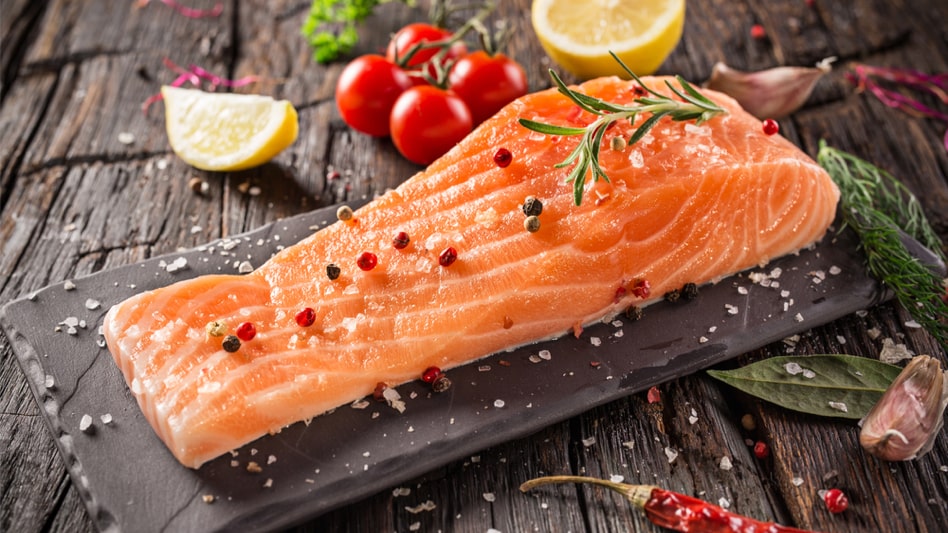
Our AI Image Cropping API provides an intelligent solution for resizing images to specified dimensions by automatically detecting the main subject and applying the best cropping method. Utilizing advanced machine learning algorithms, this API ensures that the key elements of the image are preserved and highlighted, resulting in perfectly composed and aesthetically pleasing crops. Ideal for photographers, web developers, and digital content creators, this tool streamlines the image editing process by offering precise and efficient cropping solutions. Integrate our AI Image Cropping API into your application to enhance user experience with seamless, high-quality image cropping that maintains the integrity and focus of the original photo. Enhance your platform with this powerful API, providing users with an effortless way to achieve perfectly cropped images every time.
{"data":{"retain_location":{"x":0,"y":0,"height":500,"width":500},"url":"https:\/\/ai-result-rapidapi.ailabtools.com\/image\/changeImageSize\/2024-06-15\/071738-3ec81f13-9d71-bc95-2ef0-1b3363b94f44-1718435858.jpg"},"error_code":0,"error_detail":{"status_code":200,"code":"","code_message":"","message":""},"log_id":"92611642-E2DC-5B30-B6BF-51FE262EE47C","request_id":"92611642-E2DC-5B30-B6BF-51FE262EE47C"}
    curl --location 'https://zylalabs.com/api/4437/ai+image+cropping+api/5450/ai+image+cropping?width=Required&height=Required' \
    --header 'Content-Type: application/json' \
    --form 'image=@"FILE_PATH"'
| Header | Description |
|---|---|
Authorization
|
[Required] Should be Bearer access_key. See "Your API Access Key" above when you are subscribed. |
No long-term commitment. Upgrade, downgrade, or cancel anytime.
Our Image Cropping API provides an intelligent solution for resizing images to specified dimensions by automatically identifying the main subject and applying the best cropping method. Utilizing advanced image analysis techniques, this API ensures that the most important parts of the image are preserved while transforming the image to fit the desired size. Ideal for photographers, web developers, and digital content creators, this tool simplifies the cropping process, ensuring high-quality, well-composed results every time.
Photography: Automatically cropping photos to enhance composition and focus on key subjects. E-commerce: Optimizing product images for better presentation on online stores by automatically cropping to the best framing. Social Media: Preparing images for various social media platforms by cropping them to the required dimensions and aspect ratios. Graphic Design: Cropping images to fit design templates and layouts accurately. Web Design: Automatically adjusting image sizes to fit different sections of a website, ensuring a consistent look. Archival and Documentation: Cropping scanned documents or photos for better clarity and focus.
Precision: Automatically identifies and crops to the most important parts of an image, ensuring optimal composition. Efficiency: Saves time by automating the cropping process, especially useful for batch processing large numbers of images. Consistency: Delivers consistent results across various images, maintaining a uniform look and feel. Versatility: Applicable to various fields, including photography, e-commerce, social media, graphic design, web design, print media, video production, and archival work. Customization: Allows for adjustable settings to meet specific requirements for different platforms and uses.
The AI Image Cropping API returns a JSON response containing the cropped image URL and metadata about the cropping process, including the dimensions and coordinates of the original image's key subject.
Key fields in the response include `url` (the link to the cropped image), `retain_location` (an object with `width`, `height`, `x`, and `y` coordinates indicating the original image's cropping details), and `error_code` for tracking any issues.
The response data is structured in a JSON format with a top-level object containing `request_id`, `log_id`, `error_code`, and a `data` object that holds the cropped image URL and retain location details.
The endpoint accepts three parameters: `image` (the image file), `width` (target width in pixels), and `height` (target height in pixels). All parameters are required for a successful request.
Users can customize their requests by specifying the desired `width` and `height` for the cropped image, allowing for tailored outputs based on specific application needs or platform requirements.
The API provides information about the cropped image, including its URL, dimensions after cropping, and the coordinates of the original image's key subject, enabling users to understand the cropping context.
Users can utilize the returned `url` to display the cropped image in their applications, while the `retain_location` data helps in understanding how the cropping affects the original image's composition.
Typical use cases include enhancing product images for e-commerce, preparing social media posts, and optimizing images for web design, where precise cropping is essential for visual appeal and clarity.
To obtain your API key, first sign in to your account and navigate to the API you want to use. From the API's Pricing section, choose a plan and complete the subscription process. Once subscribed, return to the API page and you will see your API Access Key displayed at the top of the documentation page. You can use this key to authenticate your requests.
You can’t switch APIs during the free trial. If you subscribe to a different API, your trial will end and the new subscription will start as a paid plan.
The free trial lasts for 7 days and allows you to make up to 50 API requests.
No, the free trial is available only once, so we recommend using it on the API that interests you the most. Most of our APIs offer a free trial, but some may not include this option.
Yes. If the API offers a free trial, you will see a "Free 7-Day Trial" option in its Pricing section. The trial lasts for 7 days and allows up to 50 API requests, enabling you to evaluate the API before subscribing to a paid plan.
Zyla API Hub is like a big store for APIs, where you can find thousands of them all in one place. We also offer dedicated support and real-time monitoring of all APIs. Once you sign up, you can pick and choose which APIs you want to use. Just remember, each API needs its own subscription. But if you subscribe to multiple ones, you'll use the same key for all of them, making things easier for you.
You can monitor your API usage through the response headers included with every request:
x-zyla-api-calls-monthly-used: Shows the total number of API requests you have used during the current billing period.
x-zyla-api-calls-monthly-remaining: Shows the number of API requests you have remaining for the current billing period.
Yes, you can cancel your subscription at any time. Simply go to the Pricing section of the API you're subscribed to and click the "Unsubscribe" button.
Please note that upgrades, downgrades, and cancellations take effect immediately. Once your subscription is canceled, access to the service will end immediately, regardless of any remaining API calls in your quota.
Please have a look at our Refund Policy: https://zylalabs.com/terms#refund
Service Level:
100%
Response Time:
210ms
Service Level:
100%
Response Time:
237ms
Service Level:
100%
Response Time:
152ms
Service Level:
100%
Response Time:
152ms
Service Level:
100%
Response Time:
122ms
Service Level:
100%
Response Time:
812ms
Service Level:
100%
Response Time:
364ms
Service Level:
100%
Response Time:
283ms
Service Level:
100%
Response Time:
261ms
Service Level:
100%
Response Time:
264ms